- IOportal
IOportal Puts Every Port in Focus
IOportal is back with a focused set of enhancements. The theme of this release is visibility: seeing how your Hitachi ports are actually loaded, and getting performance data into IOportal from every array generation, including the newest VSP One Block systems.
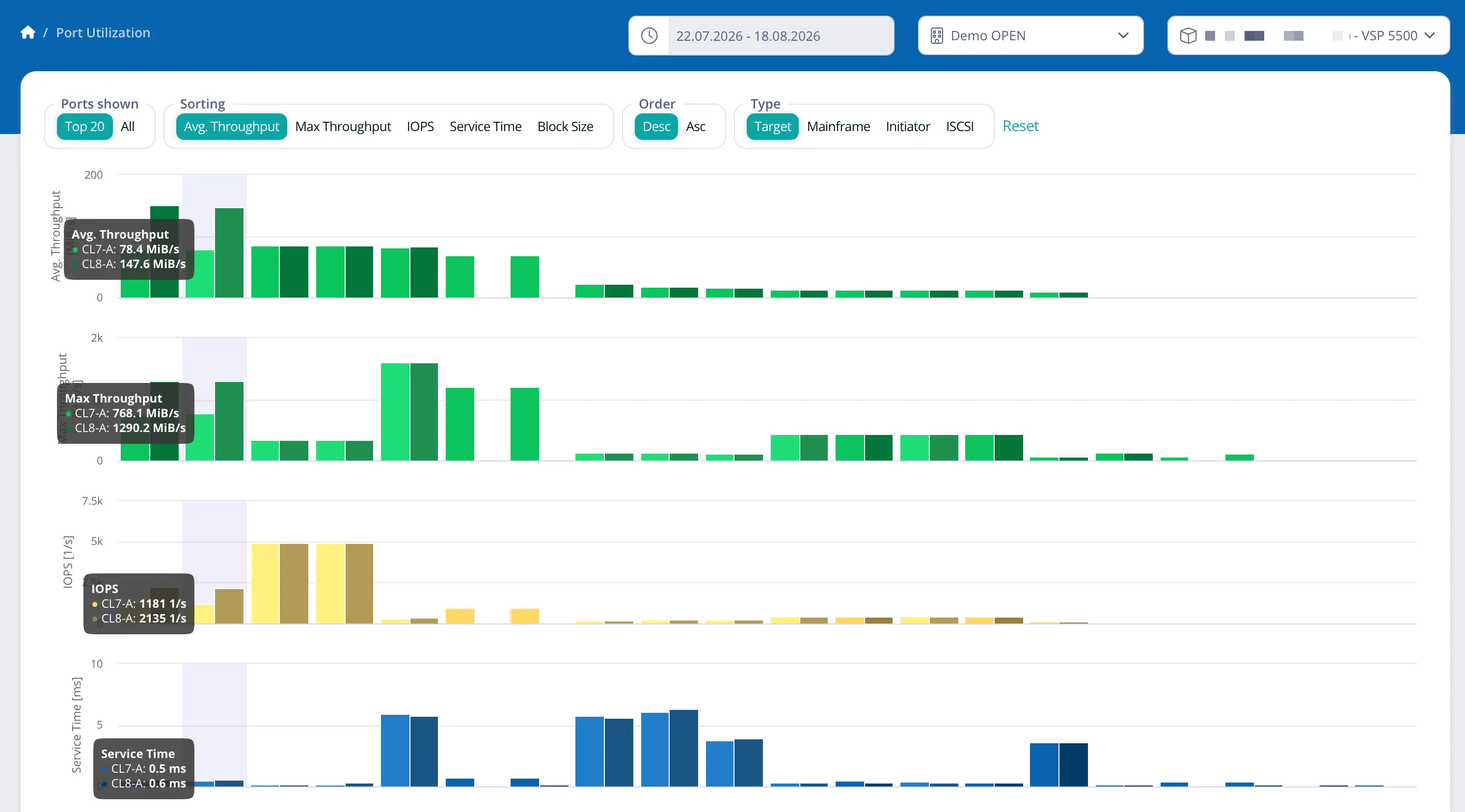
See how your ports are really loaded
A new dashboard page puts port utilisation at the centre, with an interactive graphic you can drive over a preset or a custom time window. Target, mainframe and SCSI ports each get their own view, which makes analysis and load balancing far easier than reading one combined chart. Port imbalances caused by multipathing problems, and the performance bottlenecks that follow from them, become visible at a glance.
Support for the Hitachi Export Tool 2
IOportal now processes performance statistics collected with the Hitachi Export Tool 2 for selected machine types. E Series arrays are supported with both export tool 1 and export tool 2, while VSP One Block 24, 26 and 28 are supported exclusively with export tool 2.
Agent configuration through SAM4H
Customers who collect their IOportal data through SAM4H version 2.3 or later will find a new IOportal Agent configuration section. Choose freely between export tool 1 and 2 for all E Series systems, and benefit from a more user-friendly configuration with encrypted configuration files for increased security.
Anyone still working with export tool v1 also gets a new alert that points out CUs which are not configured for performance monitoring, so gaps in your data no longer go unnoticed.
Also in this release
- A new contact form inside the IOportal GUI, to reach peaq Support directly for assistance or feedback.
- Capacity reports now show the total capacity across multiple pools on the storage array capacity page.
- On-premise deployments can run with Podman and rootless containers, and IOportal containers now include built-in cron jobs for scheduled operations.
- Various fixes and minor refinements for improved stability and usability.
The cloud service is already up to date, so the new dashboard is waiting for you at your next login. On-premise customers can request the current package from peaq Support.